
In an earlier post, I bought a keyboard case for my iPad to see what writing on there would be like. This was a way for me to find more use out of my tablet, or my wife would’ve jumped right at the moment and said, “I knew you wouldn’t use your iPad. And you said that you wanted to buy one.” So, here I am after a week of only writing on my iPad. What are some benefits, and what are some downsides to using the iPad over the laptop that I already own?
Let’s start with the keyboard case itself
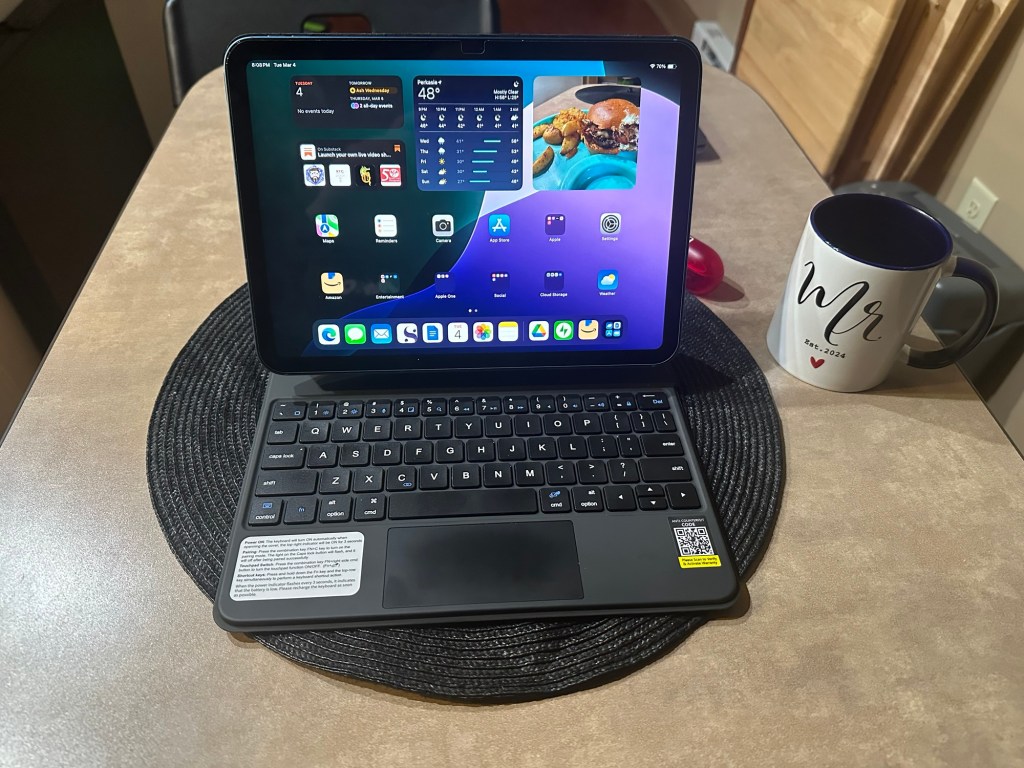
I ended up buying the runelk case as a middle-of-the-road option that was neither too cheap nor too expensive. This “case,” I guess I should emphasize, is more of a holder for the iPad. Nothing surrounds the device; it only holds it in place by its magnetic stand, which gives you the feeling of a laptop when opened and you’re staring at the screen. But you can close it up, and it’s secure from the strong magnet it has, so that’s some protection at least as a case would do.
The keyboard has a compact layout. You have your Qwerty layout and function keys to adjust volume, brightness, and commands like screenshot and lock screen, for example. To keep it the same size as the iPad, we don’t have the additional numpad, so any number crunching will have to be done by the top row of the keys.
To give it the whole laptop experience, the trackpad is located below the keyboard to move the cursor around and use motions to switch apps, close out programs, and many more. When the touchpad is fully working, it’s a dream to use. But I don’t know if it’s because this keyboard connects to the iPad via Bluetooth; it can sometimes be unreliable. To go back to the home screen, it’s a three-to-four-finger swipe upwards. With it not always working, I’ll have to use my finger on the screen to get out of the app or hit fn (function) and the tilde button. A hassle at times when you’re expecting the touchpad to work, 100%.
The battery for this keyboard is phenomenal. I charged this last week, and I have only made close to 20% of the battery usage. This is from using it daily for at least an hour, minimum, of my time, doing things like writing blog posts here, working on my novel, or posting on social media. I can fully charge this keyboard, go somewhere for the week, and not worry about the battery on this one bit.

I’ll say it’s well worth the price I paid. If the touchpad was more responsive—and I don’t know if it’s the difference between Bluetooth and Smart Connect—this would almost be a perfect accessory. I still recommend it, but if the touchpad is a must-have for reliability, I would check other options.
The good on writing on an iPad
This is a not-so-convincing rant, but I enjoy the feel of writing on the iPad. It’s a new form factor of writing, and it shows how far we’ve come in ways of writing with technology. The iPad, which started as an oversized iPod (how I previously felt about it), could now be my personal laptop replacement if it had all the missing pieces I want.
From a physical point of view, the iPad saves so much space on the table, desk, or wherever you’re writing, compared to a laptop of a bigger size. The iPad is still smaller than some Chromebooks, but if you go with the iPad Pro model, you’ll see that the iPad is bigger than most Chromebooks. This 10.9” screen is the perfect size for me.

Coming off of what I remember my previous iPad could do, the new PadOS has improved immensely. Adding split-screen functionality makes multitasking an easy and seamless process. While the screenshot below is for a negative point in writing on an iPad, it can also be a positive, given its use case. For research on your writing, one side could be your word processor, while the other can be your web browser or another app. Both are on the screen and switching back and forth is unnecessary.
I wouldn’t be surprised if students or people in the workforce made this their full-time device. I’m still in awe when I use it.
And now, the not-so-great…
To start, this is a great way to get your writing done, and you can do a hell of a lot on here. However, it has limitations compared to a laptop with the web or desktop version of applications.
Let’s start with Jetpack; since I’m writing here, I think that would be fair to start off, right?
It’s a minor issue, but it would’ve been nice to use the rest of the screen for outlines or more options since I’m only using half of the screen anyway. Below is what I must do to compromise what I’m looking for. Luckily, I can slide over the middle bar if I need more space on one app over the other.

The next, and to my subscribers, I’m sure you may have noticed, is that there is no option (not that I have found that is) to choose between Post & Email or just Post. When I answer daily prompts or write a small ramblings about whatever, I don’t feel it is necessary to email my subscribers about it. I feel like I’m wasting their time, so I tend to pick the post-only option, which isn’t available on the app.
The last thing I can think of is that this is a minor issue. Not involving the Jetpack app, by the way. But now that I have moved my fiction to Substack, I have published two microfiction stories there. I could not apply the proper tags to both stories, which helps people find my work. I can at least do that on the Jetpack app here, but not Substack. This is more of an issue with the Substack app and not the iPad, but that’s a limitation on what the iPad can’t do for you now.
Maybe all of this will change in the upcoming months or years after the software is updated, but it’s almost perfect.
My Final Thoughts
It’s safe to say that my iPad is so close to being a complete replacement for my laptop. For a few small things, I have to open up the Lenovo Yoga to either publish a story properly or make a few adjustments that the iPad could not do. All these things I can deal with if I shift my entire focus to the iPad and make the laptop my secondary device.
The next step for me is to try out a new keyboard for the iPad. I’d like to see the difference in quality when using the Smart Connectors with pairing to the iPad. But that won’t be for a while, as I have no issues with the runelk keyboard.
I’ve been pretty obsessive over this for the last week or so. Its appeal will fade with time. I just like to write when I get excited, especially when I get something new to try.
But I’ll be writing more content here with this device!
 Brad Michael, Writer
Leave a comment